Showing posts with label Aplications. Show all posts

3-D Analyser

3d Analyze is a Graphics Card Emulator that can emulate all the features of a 3d graphics card like pixel shader 1.1, 1.4, 2.0, bump maps and lots stuff. If a game stops running on your system just because u don't have a graphics card, don't worry! 3d analyze will do it for you. Run 3danalyze, Select the game exe, Select a few options you want to emulate and there u go the game runs perfectly now.
  1. Download 3D-Analyze 2.36b and Install somewhere
  2. Start 3D-Analyze
  3. Click Select. A window will open, Navigate to the .exe of the game you want to play.
    Ex. C:/Program Files/Activision/Call of Duty 4
  4. Now put a tick in the boxes, Emulate HW TnL Caps, Emulate other dc8.1 caps, Emulate pixel shader caps, and Force high precision pixels.

    This is the recommended setting that will work with all the games:

5. Now Click "Save batch file" and a window will open asking what you want to name the batch file & where you want to save it to. Save it to your desktop. Now go to your desktop and double click the batch file you just created. This will start the game. (In order to play the game you will have to use that bat on you desktop to run it)

Click here to Download

    Universal Usb Installer-Usb Boot


    Universal USB Installer is a Live Linux USB Creator that allows you to choose from a selection of Linux Distributions to put on your USB Flash Drive. The Universal USB Installer is easy to use. Simply choose a Live Linux Distribution, the ISO file, your Flash Drive and, Click Install. Other features include; Persistence (if available), and the ability to fat32 format the flash drive (recommended) to ensure a clean install. Upon completion, you should have a ready to run bootable USB Flash Drive with your select Linux version installed.


    Universal USB Installer (UUI) Screenshots
    Universal USB Installer Steps

    Universal USB Installer - Progress Window


    Click here to Download

    Radmin 3.4 Remote Control Software


    Radmin is one of the safest, fastest and most popular remote access software solutions designed for Windows.
    A remote computer screen can be viewed on a local monitor in either a window or a full-screen display. All mouse movements and keystrokes are transferred directly to the remote computer.
    Files can be transferred to and from the remote computer, and communication with the remote computer's user is possible by either Text Chat or Voice Chat.

    Download

    Make Multiboot CD/DVD With Easy Boot

    EasyBoot is a convenience and integrated tool for making Multiboot CD/DVDs, it can create boot menu, create bootable file automatically, and generate a bootable ISO file easily. If you have a CD/DVD burner and relate software, you can create your own bootable CD entirely.

    Some Features of EasyBoot

    1. Graphical interface entirely, easy to use and learn even for a newer.
    2. The CD-ROM root directory burned only have one directory (EZBOOT) added, does not destroy the original native style.
    3. Support up to 36 menu items.
    4. Support for up, down, left, right cursor keys and the tab key to select Menu, Enter, Space key implementation.

    EasyBoot Download

    Click here
    Password: triks4all.blogspot.com


    EasyBoot Installation

    1. When finished download EasyBoot, click Installer.
    2. Welcome install EasyBoot5, agreed to the installation license agreement of EasyBoot.
    3. Select the installation directory for the EasyBoot.
    4. Create a shortcut for EasyBoot, press OK to continue;
    5. Select the initial settings for the EasyBoot, where the first two, the first is to create the desktop icon did not say, the next in options is. Ezb format file association, check it OK, so if we double click the . Ezb files next time. it will be opened by Easyboot automatically.
    6. Complete installation and run EasyBoot EasyBoot.

    How to use EasyBoot?

    1. EasyBoot startup interface screen shot is shown above. the left is the main controller, the right window is a preview window. you can close or show the preview through the settings in the main controller(Position: Preview Window).
    2. Let's talk about the use of EasyBoot specifically , it seems there are so many settings in EasyBoot, in fact, commonly few of them are used often for making a bootable CD/DVDs.
    3. At first, where is the working directory you have set. I suggest set it to the non-system drivers. for instance, D:\.
    4. Waiting time is the launch window waiting time, 30 seconds is the default value, if the bootable program doesn't get any operations from the user, the default menu option will be stated.
    5. EasyBoot Logo image means whether to show a welcome screen in initial boot routine, it is often used as a advertisement interface. such as a company product, etc., generally do not need.
    6. The Background image option is necessary, otherwise the back is a black screen, the background image(BACK.BMP) can be edited by mspaint.exe or any other photo process software. but attention please, the image pix should not be high than 648*480, if so, the final bootable program may have some compatible problems in some lower screen.
    7. EasyBoot Screen layout is the planning and design of the boot CD-ROM interface, the text is to control the Display tab in addition to the main menu bar and display text other than the location and effect of prompt information display.
    8. EasyBoot Menu bar is to set the mirror of the menu commands, which the menu and what is the meaning of command.
    Here you can use EasyBoot to start making your bootale Disk, you can design the boot menu in your personalized style. When you want to generate a ISO image. you should not burn it to a CD/DVD without any testing or validation. Some basic testing should be executed in your virtual PCs(VMWare), and then the real testing of burning.

    VLC 2.0 Latest Download


                                                                                                                                                                                                                    VLC 2.0 "Twoflower" is a major new version of our popular media player.
      With faster decoding on multi-core, GPU, and mobile hardware and the ability to open more formats, notably professional, HD and 10bits codecs, 2.0 is a major upgrade for VLC.
      Twoflower has a new rendering pipeline for video, with higher quality subtitles, and new video filters to enhance your videos.
      It supports many new devices and BluRay Discs (experimental).
      Completely reworked Mac and Web interfaces and improvements in the other interfaces make VLC easier than ever to use.Twoflower fixes several hundreds of bugs, in more than 7000 commits from 160 volunteers.
      m 160 volunteers.  
         Click here to Download                                          

      Extend(Reset) the Windows 7 Trial


      Did you know that you can install Windows 7 without any license key and use it for 30 days? What you might not know is that you can also extend that trial mode to 120 days, without requiring a key.


      The basic way this works is that at the end of the 30 days, you’ll need to run a small command and reboot your computer, at which point you’ll have 30 more days, up to a maximum of 120 days. This trick should work regardless of where you got your copy of Windows 7 from.
      Extending the Trial By 30 Days
      The first thing you’ll want to do is check how many days are left in your trial period. You can do this by right-clicking Computer and choosing Properties…
      At the bottom of this window you’ll see how many days are left to activate (29 in my case since I installed this box yesterday).
      Now to actually perform the hack that will extend the trial mode, you’ll want to find Command Prompt in the start menu (or search for it), and then right-click on it and choose Run as administrator. (very important)
      Windows 7 Command Prompt as Administrator
      Next you’ll simply type in this command:
      slmgr -rearm
      Windows 7 slmgr rearm
      Within a few seconds you’ll normally see this dialog show up, saying that the command has completed successfully, at which point you’ll want to reboot.
      Windows 7 slmgr Success
      Checking the system properties again shows that I now have 30 days left to activate.
      Windows 7 Activation 30 days
      Of course you’d normally want to do this near the end, probably on the last day before activation. I’m pretty sure that you can even perform this trick after the 30-day trial expires, although I’m not certain yet.

      How to send self-destructing messages

      How to send self-destructing messages


      Many times there is the need of sending a written data to a person but you do not want him/her to keep that data for further reading or as a record. Today i am going to tell you how can you send the self-destructing messages. After reading the message, it will not be availabe again for reading. 

      Follow these steps for sending self-destructing messages.


      1. Go to the www.privnote.com
      2. Write the message you want to send.
      3. If you want to get the notification when the note was read, you can mark and enter your email id for notification.
      4. Then click on Create not.
      5. Now it will give you a link. Send this link to the person by email.
      6. The note will self-destruct after being read

      How to Download YouTube Videos: Easiest Way


      Download YouTube VideosYouTube is undoubtedly the most preferred website to share and watch favorite videos. Most users prefer to watch the videos online, while a few others like me, would like to download them so that, they can be saved and retained. Well, if you are one among those few who would like to download the videos from YouTube, then here is a way to do that.
      In fact, there are many ways to download videos from YouTube, but here in this post, I would like to share with you one of the easiest way to do that. This can be done as follows:
      1. Download and install the latest version of Internet Download Manager.
      Internet Download Manager is a great add-on for your web browser which increases the download speed by 5 times. It also helps you to pause/resume and schedule your downloads. It has got a great interface and is user friendly. It works with most of the browsers including IE, Firefox, Chrome, Safari and Opera.
      2. After you complete the installation, just open your browser and start searching for your favorite video on YouTube. You will see the download button on top of the video using which you can download it instantly.


      3. Click on the “Download this Video” button to save the video onto your computer. The downloaded video will be in the flash video format (.flv).
      4. You can use VLC Player to play the downloaded video or use SUPER to convert it to your desired format.
      By using this trick, you can download almost all the buffering content on the Internet including videos from MySpace and Google. I hope you like this small post. Don’t forget to pass your comments. Enjoy :)

      COMMAND PROMPT ON RIGHT CLICK

      Many of Computer users specially programmers needs to launch command prompt many times while to execute the DOS/shell commands.
      The problem is that while a command prompt is launch default path is system or user's profile path. We need to use cd command to change our directory every time.
      so to avoid this just follow steps given below:

      • Click on Start.
      • Then Click on Run.
      • Type regedit in run box.
      • Navigate to key: HKEY_LOCAL_MACHINE\SOFTWARE\Classes\Folder\Shell.
      • Right Click on shell and select New > Key.
      • Change the name of this key to command.
      • Double click on default text the right window to bring up the edit box.
      • Enter this text into value data field: cmd.exe "%1"
      • Click on OK to close registry edit.

      Arclab Watermark Studio 2.2 Portable


      Arclab Watermark Studio 2.2 Portable | 7.5 Mb
      Digital Watermark Photo Protection and Batch/Bulk Image Watermarking Software for WindowsArclab Watermark Studio is an easy to use image watermarking software to add visible and transparent watermarks to multiple images in a batch.It allows you to protect your photos from unauthorized distribution using one of the included or a custom watermark which could be added on any position and size. In addition to graphics and logos, it also supports direct text watermarks, which could be entered directly or imported from an image.The watermarking software can also can be used to create thumbnails, resize and convert images. There is only one click required to process a whole directory of images and photos.Watermarking Software Features:
      * Protect your photos using a visible watermark or logo
      * Visual marketing
      * Supports jpeg,png,gif,tiff, bmp and psd images
      * Convert images to popular image formats
      * Resize images and create thumbnails
      * Transparent watermarks with custom opactiy
      * Add custom text and comments to images
      * (Import comments from EXIF, IPTC, JPEG, filename)
      * Batch processing.

      Homepage - http://www.arclab.com/

       Download From FileSonic
      http://www.filesonic.com/file/1114030684

      Download From WUpload
      http://www.wupload.com/file/6645791

      Norton Internet Security 2011


      Instructions:

      1. If Norton is installed and [expired], then [Uninstall] Norton. (If Norton is installed but has not expired, then skip to Step 4.)

      2. Restart your computer and run the NTR to purge Norton.

      3. Install Norton.

      4. Turn OFF the [Norton Product Tamper Protection] in the "Miscellaneous Settings" before using Norton internet security unless NTR deletes the trial reset and you wants to download again.


      5. With the internet connection, install the NTR. (Don't run the NTR when Norton is updating or scanning the computer.)

      6. After installation, create your own Norton Account to get rid of the nag.

      7. After installation, update, configure your settings, then you should restart the computer. (Don't forget to do a full system scan.)

      8. IF you want to uninstall the NTR, just click the Uninstall. Make sure that you uninstall the NTR before you remove Norton.
      Norton Download
      Trial Reset Download

      Post comment if you like!!!!!!!!!

      UltraISO Premium 9.3.6.2750


      UltraISO Premium 9.3.6.2750 | 5.6 MB
      UltraISO is an ISO CD/DVD image file creating/editing/converting tool and a bootable CD/DVD maker , it can directly edit the CD/DVD image file and extract files and folders from it, as well as directly make ISO files from your CD/DVD-ROM or hard disk. At the same time, you can maintain the ISO bootable information, thus creating your own bootable CD/DVDs. You now have the power to make and edit your own ISO files, and then burn them to CD/DVD for your own needs. UltraISO is in sole possession of the intellectualized ISO document format analyzer, it can process at the present time almost all types of image files, including ISO and BIN, it may even support new image files which are yet to be created. UltraISO can open these image files, directly extract files and folders, edit it and convert other image files to the standard ISO format. UltraISO uses the double window unification user contact interface, you have the choice to only use the quick buttons and/or the mouse Drag & Drops, you can handle any CD/DVD image file easily.

      Main Features:
      Can directly edit the ISO image file.
      Can directly extract files and folders from ISO image file
      Can add / delete /create new directory /rename ISO file image content.
      Can make ISO file from hard disk document.
      Can create CD/DVD image from CD/DVD-ROM, maintain bootable information.
      Can process the compact disc boot information, you can directly add/remove/extract boot image of the ISO image.
      Supports nearly all known CD/DVD image file formats (.ISO, .BIN, .IMG, .CIF, .NRG, .MDS, .CCD, .BWI, .ISZ, .DMG, .DAA, .UIF, .HFS and so on) , and can convert them to the industry standard and widely supported ISO image format.
      May directly set the file/folder to hidden attribute
      Supports ISO 9660 Level1/2/3 and Joliet extension
      Automatically optimizes the ISO image file structure, saves the disc space.
      Supports the shell document type integration, Open Image files through double clicking them or the Right Click menu of the mouse with the open dialog.
      The double window user interface is extremely convenient to use.
      There are rich add-on tools, you can create ALL in 1 bootable compact discs, CD/DVD image file management, even the virtual CD/DVD drive , those functions are really powerful.
      Installation
      Unpack, install, Use Keygen to Register
      Enjoy
      Download:
      Hotfile
      Filesonic

      File splitter and joiner

      FFSJ consists of two main programs: File Splitter and File Joiner. File Splitter enables you to split a large file into small chunks which are easy to be sent and stored, while File Joiner allows you to join these split parts together so that the original file is restored.
      DOWNLOAD

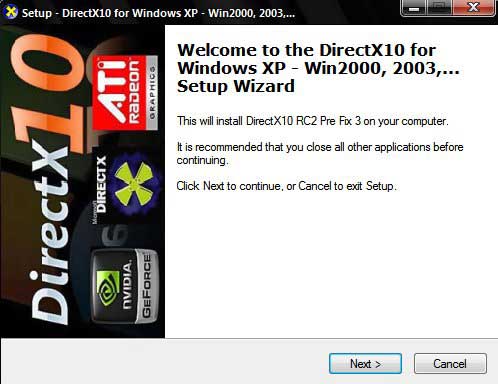
      Direct x 10 for xp+source codes

      I have listed download DirectX10 for XP installer that found over internet.


      Latest DirectX 10 XP installer patch that easily installing all the important DirectX10 DLL on Windows XP 32. Meanwhile, this DirectX10 installer program support Windows 2000 and Windows 2003.

      Winar


      WinRAR is a powerful archive manager. It can backup your data and reduce the size of email attachments, decompress RAR, ZIP and other files downloaded from Internet and create new archives in RAR and ZIP file format. You can try WinRAR
      download